Grid
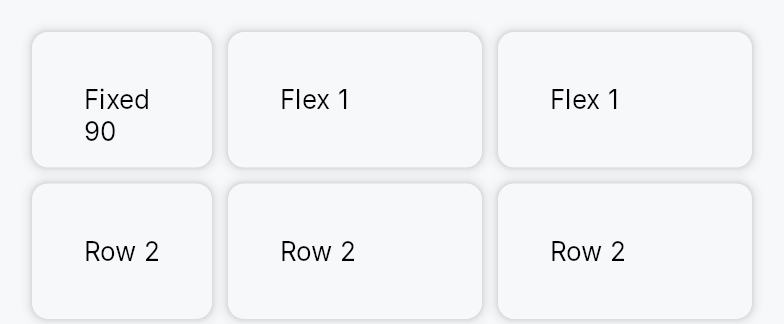
Grid — a 2D layout container with explicit row and column tracks.
Public types
| Kind | Name |
|---|---|
enum | TrackSize — Sizing mode for a single row or column track in a Grid |
struct | Grid — A 2D grid layout container with explicit track declarations |
Public functions
Grid
| Returns | Function |
|---|---|
| Constructors | |
Self | new() |
| Builder methods | |
Self | columns(columns: Vec<TrackSize>) |
Self | rows(rows: Vec<TrackSize>) |
Self | column_gap(gap: impl Into<Prop<f32>>) |
Self | row_gap(gap: impl Into<Prop<f32>>) |
Self | child(widget: impl teksilo_core::IntoTeksiChild) |
Self | children(iter: impl IntoIterator<Item = impl teksilo_core::IntoTeksiChild>) |
Self | child_opt(widget: Option<impl teksilo_core::IntoTeksiChild>) |
Detailed description
Columns and rows are declared as TrackSize slices supporting three
sizing modes: Fixed(px) (exact logical pixels), Auto (sized to the
largest child in that track), and Fractional(fr) (share of the remaining
space after fixed and auto tracks are allocated — the CSS fr unit).
Children are placed in row-major order: child 0 occupies cell
(row=0, col=0), child 1 (row=0, col=1), and so on. Dormant children
are excluded from placement while keeping their siblings at their original
cell positions, so toggling a cell visible/dormant does not shift other
cells.
Fractional columns fall back to the child's natural width when the parent provides no width constraint (intrinsic-measurement pass), preventing wrap-aware children from reporting inflated heights.
#![allow(unused)]
fn main() {
use teksilo_widgets::primitives::{Grid, TrackSize, RectWidget};
// Two equal columns with a fixed 40 dp row, separated by an 8 dp gap
let _grid = Grid::new()
    .columns(vec![TrackSize::Fractional(1.0), TrackSize::Fractional(1.0)])
    .rows(vec![TrackSize::Fixed(40.0)])
    .column_gap(8.0)
    .child(RectWidget::new())
    .child(RectWidget::new());
}
Density
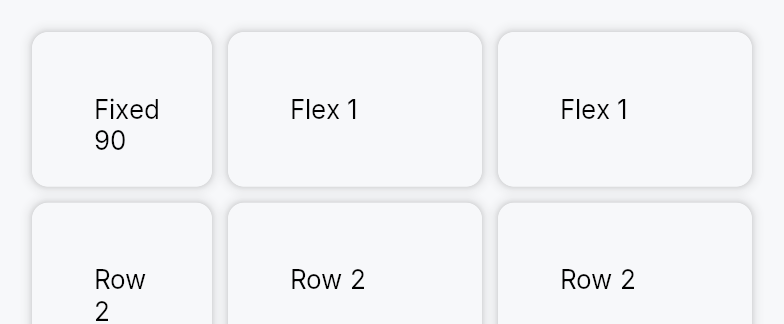
The picture above is the widget at TargetDensity::Compact, the mouse-and-keyboard ladder. Below is the same subject on the same canvas with only the ladder changed, so what moves is the density and nothing else — where the subject no longer fits, that is what the denser targets cost it at that size. See docs/density-and-targets.md.
Touch
API reference
📖 Full rustdoc API for this module
pub enum TrackSize
Import: use teksilo::widgets::TrackSize;
Sizing mode for a single row or column track in a Grid.
#![allow(unused)]
fn main() {
pub enum TrackSize { /* variants */ }
}
Variants
Fixed(f32)— Fixed size in logical pixels regardless of available space.Fractional(f32)— Share of the remaining space afterFixedandAutotracks are resolved; equivalent to the CSSfrunit. MultipleFractionaltracks divide the remainder proportionally to their weights.Auto— Sized to the largest intrinsic dimension among all children in the track; expands to fill content, never clips.
pub struct Grid
Import: use teksilo::widgets::Grid;
A 2D grid layout container with explicit track declarations.
#![allow(unused)]
fn main() {
pub struct Grid { /* fields */ }
}
Methods
pub fn new() -> Self
Create a new Grid with a single Auto column and a single Auto
row; configure track definitions with columns and
rows.
pub fn columns(mut self, columns: Vec<TrackSize>) -> Self
Set the column track definitions; each entry describes one column's sizing mode.
pub fn rows(mut self, rows: Vec<TrackSize>) -> Self
Set the row track definitions; each entry describes one row's sizing mode.
pub fn column_gap(mut self, gap: impl Into<Prop<f32>>) -> Self (default: 0.0)
Set the inter-column gap. Accepts static f32 or Signal<f32>.
pub fn row_gap(mut self, gap: impl Into<Prop<f32>>) -> Self (default: 0.0)
Set the inter-row gap. Accepts static f32 or Signal<f32>.
pub fn child(mut self, widget: impl teksilo_core::IntoTeksiChild) -> Self
Append an inline child widget in the next cell (row-major order).
pub fn children( mut self, iter: impl IntoIterator<Item = impl teksilo_core::IntoTeksiChild>, ) -> Self
Append multiple inline children from an iterator, each occupying the next cell in row-major order.
pub fn child_opt(mut self, widget: Option<impl teksilo_core::IntoTeksiChild>) -> Self
Append an optional inline child; a None value is a no-op, keeping
subsequent children at their original cell positions.