GroupBox
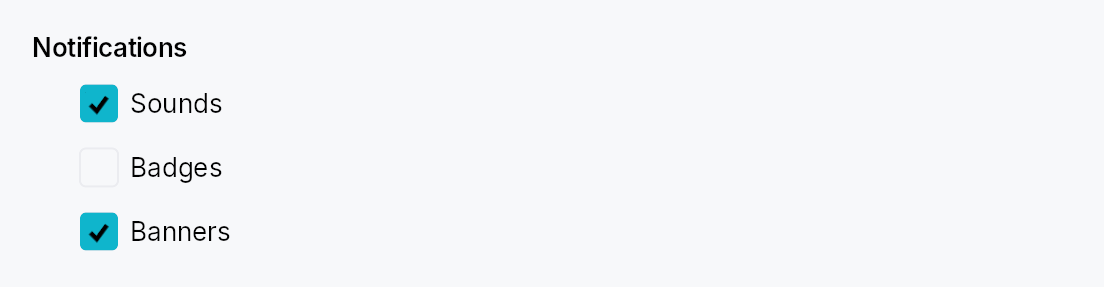
GroupBox — titled cluster of controls in Int UI / Jewel style.
Public types
| Kind | Name |
|---|---|
const | GROUP_BOX_CONTENT_INDENT — Horizontal indent of the content area below the title (dp) |
fn | group_box_content_indent — GROUP_BOX_CONTENT_INDENT scaled by the density's spacing_factor (1.00 / 1.15 / 1.30) |
const | GROUP_BOX_TITLE_CONTENT_SPACING — Vertical gap between the title row and the content area (dp) |
fn | group_box_title_content_spacing — GROUP_BOX_TITLE_CONTENT_SPACING scaled by the density's spacing_factor (1.00 / 1.15 / 1.30) |
const | GROUP_BOX_CHECKBOX_GAP — Gap between the checkbox and the adjacent title label in checkable mode (dp) |
fn | group_box_checkbox_gap — GROUP_BOX_CHECKBOX_GAP scaled by the density's spacing_factor (1.00 / 1.15 / 1.30) |
struct | GroupBox — A titled cluster of controls with optional enable/disable toggle |
Public functions
GroupBox
| Returns | Function |
|---|---|
| Constructors | |
Self | new(title: impl Into<LocalizedString>) |
| Builder methods | |
Self | checkable(checked: Signal<bool>) |
Self | child(widget: impl teksilo_core::IntoTeksiChild) |
Self | child_opt(widget: Option<impl teksilo_core::IntoTeksiChild>) |
Detailed description
A bold title (optionally preceded by a checkbox) sits above an indented content area. No border, no frame — pure composition. The standard use is grouping related settings controls on a preferences sheet or form — the IntelliJ "group" pattern.
In checkable mode, unchecking disables event dispatch to every descendant
of the content area (via ctx.enabled_when with ancestor propagation) AND
paints a translucent surface overlay over the content so it reads as
greyed-out. The title checkbox itself stays interactive.
When to use
- GroupBox — logical cluster with a title; optional enable/disable toggle for the whole cluster. Use for settings sections.
GroupHeader— lighter-weight "soft divider + caption" without a content slot; use to label regions that are not collapsed or disabled as a unit.
Accessibility
The box node carries Role::Group and its name is set to the title
string. When checkable and unchecked, set_disabled() is set on the
group node so assistive technology announces the cluster as unavailable.
#![allow(unused)]
fn main() {
use teksilo_widgets::GroupBox;
use teksilo_widgets::primitives::TextWidget;
use teksilo_i18n::lit;
let _w = GroupBox::new(lit!("Indentation"))
    .child(TextWidget::new(lit!("Tab width: 4")));
}
Density
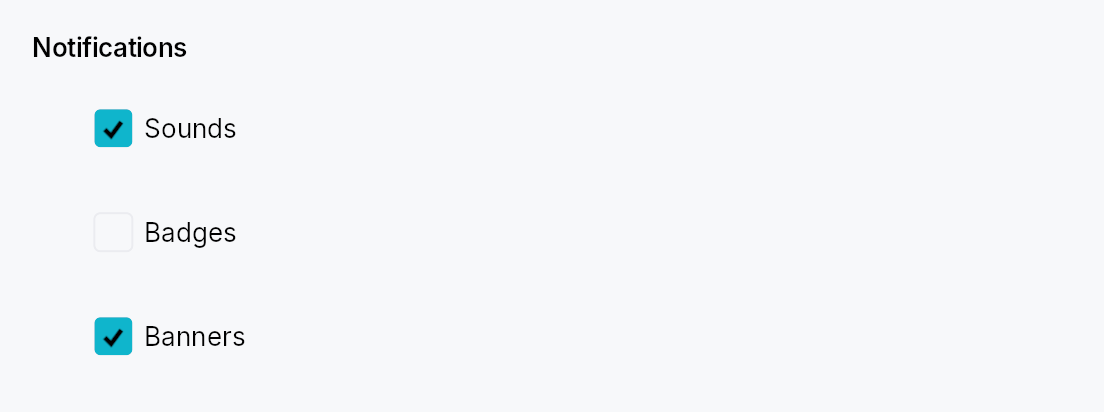
The picture above is the widget at TargetDensity::Compact, the mouse-and-keyboard ladder. Below is the same subject on the same canvas with only the ladder changed, so what moves is the density and nothing else — where the subject no longer fits, that is what the denser targets cost it at that size. See docs/density-and-targets.md.
Touch
API reference
📖 Full rustdoc API for this module
pub const GROUP_BOX_CONTENT_INDENT
Import: use teksilo::widgets::group_box::GROUP_BOX_CONTENT_INDENT;
Horizontal indent of the content area below the title (dp).
#![allow(unused)]
fn main() {
pub const GROUP_BOX_CONTENT_INDENT: f32 = 24.0;
}
pub fn group_box_content_indent(...)
Import: use teksilo::widgets::group_box::group_box_content_indent;
GROUP_BOX_CONTENT_INDENT scaled by the density's spacing_factor
(1.00 / 1.15 / 1.30).
#![allow(unused)]
fn main() {
pub fn group_box_content_indent(tokens: &InputTokens) -> f32;
}
pub const GROUP_BOX_TITLE_CONTENT_SPACING
Import: use teksilo::widgets::group_box::GROUP_BOX_TITLE_CONTENT_SPACING;
Vertical gap between the title row and the content area (dp).
#![allow(unused)]
fn main() {
pub const GROUP_BOX_TITLE_CONTENT_SPACING: f32 = 8.0;
}
pub fn group_box_title_content_spacing(...)
Import: use teksilo::widgets::group_box::group_box_title_content_spacing;
GROUP_BOX_TITLE_CONTENT_SPACING scaled by the density's spacing_factor
(1.00 / 1.15 / 1.30).
#![allow(unused)]
fn main() {
pub fn group_box_title_content_spacing(tokens: &InputTokens) -> f32;
}
pub const GROUP_BOX_CHECKBOX_GAP
Import: use teksilo::widgets::group_box::GROUP_BOX_CHECKBOX_GAP;
Gap between the checkbox and the adjacent title label in checkable mode (dp).
#![allow(unused)]
fn main() {
pub const GROUP_BOX_CHECKBOX_GAP: f32 = 6.0;
}
pub fn group_box_checkbox_gap(...)
Import: use teksilo::widgets::group_box::group_box_checkbox_gap;
GROUP_BOX_CHECKBOX_GAP scaled by the density's spacing_factor
(1.00 / 1.15 / 1.30).
#![allow(unused)]
fn main() {
pub fn group_box_checkbox_gap(tokens: &InputTokens) -> f32;
}
pub struct GroupBox
Import: use teksilo::widgets::GroupBox;
A titled cluster of controls with optional enable/disable toggle.
See the module documentation for the checkable-mode details and
the GroupHeader sibling.
#![allow(unused)]
fn main() {
pub struct GroupBox { /* fields */ }
}
Methods
pub fn new(title: impl Into<LocalizedString>) -> Self
Create a non-checkable group box with the given title.
pub fn checkable(mut self, checked: Signal<bool>) -> Self
Turn this into a checkable GroupBox. When the signal is false, events
to descendants of the content area are blocked via effective-enabled
ancestor propagation. The title checkbox itself stays interactive.
pub fn child(mut self, widget: impl teksilo_core::IntoTeksiChild) -> Self
Set the content widget inline (deferred insertion).
pub fn child_opt(self, widget: Option<impl teksilo_core::IntoTeksiChild>) -> Self
Attach widget when it is Some, and do nothing when it is None.
The conditional-child form. teksu!'s if without an else lowers to
this, and it is what cond.then(|| w) is for in a builder chain. None
adds no arena node, so nothing is laid out, painted, or published to the
accessibility tree, and a stack applies no spacing around it.