LogView
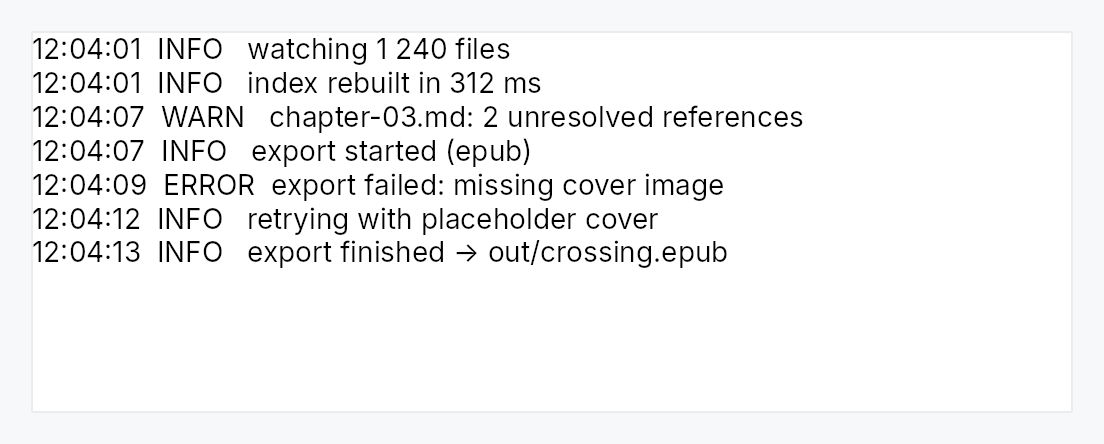
LogView — a read-only, append-only, tail-following streaming view.
Public types
| Kind | Name |
|---|---|
struct | LogView — A read-only, append-only, tail-following log / console view |
struct | LogViewHandle — A cloneable handle to append to a LogView and drive it |
Public functions
LogView
LogViewHandle
| Returns | Function |
|---|---|
| Methods | |
append(text: &str) | |
append_line(line: &str) | |
append_lines<I, S>(lines: I) | |
clear() | |
scroll_to_bottom() | |
teksilo_core::Signal<usize> | line_count() |
teksilo_core::Signal<u64> | document_version() |
teksilo_core::Signal<f32> | scroll_y() |
teksilo_core::Signal<f32> | max_scroll_y() |
Detailed description
The third face of the editor core, and the one that is not an editor. A
program writes to it, forever, faster than a person types; a person only
reads, scrolls, selects, and copies. That inversion is why it does not share
the editor's frame step — the details are in log_stream
— but it is the same CodeEditorState, so
selection, copy, scrolling, theming, and accessibility come for free and
cannot drift from the editors'.
What it adds over the read-only code viewer:
- Scale. Only the visible rows are ever laid out, so a 100 000-line
buffer costs a viewport's worth of memory, not the document's. Feed it a
scrollback_limitto bound the raw text too. - Following the tail. New lines stick the view to the bottom while it is already at the bottom; scroll up to read history and it pauses, scroll back and it resumes — derived from position, never a fight.
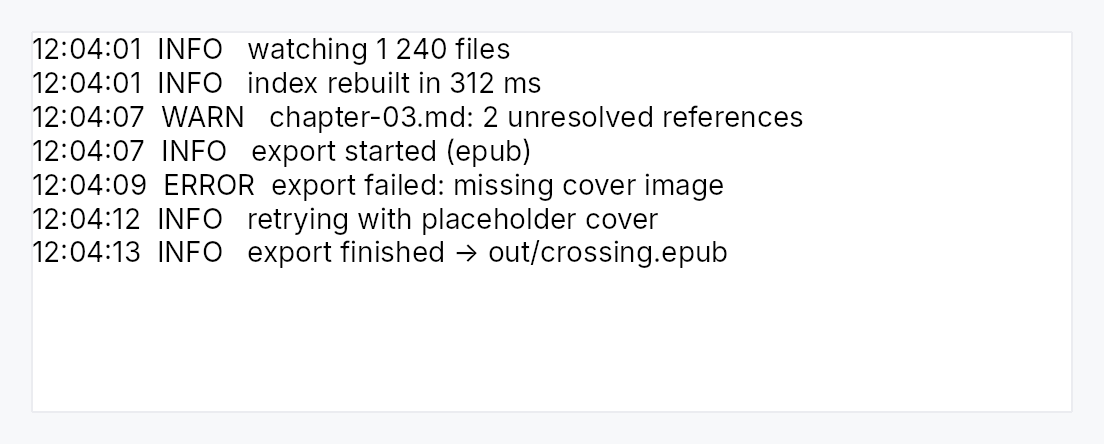
- Severity colour. An injected classifier paints a line by what it is (an error line red). Language-agnostic: the view colours a line, the application decides what an error looks like.
Pan to scroll
The surface installs common::scrollable::ScrollableBehavior
— the shared wheel arithmetic, a finger's pan, and the PanClaim. The wheel
path is unchanged: no tween (these offsets are plain signals), 16 dp a line,
Ignored at a hard boundary so the page around it takes the rest, and a
repaint asked for exactly when an axis moved.
The claim serves this surface even though it also owns the press
arena, which its double- and triple-tap recognizers give it. The router
stops its arbitration walk at the press owner only for a Gesture member,
whose recognizer the capture dispatch is already driving; a Pan member is
decided in that walk and nowhere else, so it is exempt. A finger on the
text therefore scrolls the text, and hands the gesture outward only at this
surface's own boundary. See docs/kinetic-scrolling.md §10.1.
Density
The picture above is the widget at TargetDensity::Compact, the mouse-and-keyboard ladder. Below is the same subject on the same canvas with only the ladder changed, so what moves is the density and nothing else — where the subject no longer fits, that is what the denser targets cost it at that size. See docs/density-and-targets.md.
Touch
API reference
📖 Full rustdoc API for this module
pub struct LogView
Import: use teksilo::widgets::LogView;
A read-only, append-only, tail-following log / console view.
Construct with LogView::new, feed it with a LogViewHandle from
handle, and add it to the tree. It owns an internal
document; the application never touches one directly, it only appends lines.
#![allow(unused)]
fn main() {
pub struct LogView { /* fields */ }
}
Methods
pub fn new() -> Self
A fresh, empty log view: read-only, no caret, no wrapping, following the
tail, unbounded. Attach a handle and append to it.
pub fn label(mut self, label: impl Into<teksilo_i18n::LocalizedString>) -> Self
Accessible name for the log.
Applied to the body that holds the lines, which is the node focus is
published on and the one a screen reader announces ("Build output,
document"). The view's own node is structure that no adapter shows. An
.access_label(..), .access_labelled_by(..) or tooltip attached to
the view reaches the same node.
Stays locale-reactive: a tr!(...) name is re-resolved when the
locale changes, without a rebuild.
pub fn context_menu( mut self, factory: impl Fn( teksilo_canvas::Point, &mut teksilo_core::widget::EventContext, ) -> Option<Box<dyn teksilo_core::widget::Widget>> + 'static, ) -> Self
Replace the built-in right-click menu with factory, called on each
right-click with the window position of the click. Returning None
shows no menu.
pub fn default_context_menu(mut self, enabled: bool) -> Self
Whether to install the built-in Copy / Select All menu (default true).
false lets a right-click bubble past the view.
The touch selection toolbar is not affected: it is raised by the controller rather than by a right-click, and a log a finger cannot copy from is a log a finger cannot use.
pub fn follow_tail(self, follow: bool) -> Self
Whether new lines stick the view to the bottom when it is already there
(default true). Off makes the view hold position while it grows.
pub fn scrollback_limit(self, limit: usize) -> Self
Cap the retained lines: older lines beyond limit are evicted from the
front. Unset (the default) keeps every line — memory stays flat in the
line count, since only the visible window is ever shaped, but the raw text
accumulates in the document and each append stays linear in the document's
size. A genuinely unbounded, sustained high-rate producer should therefore
set a limit; a bounded or bursty one need not. The cap is soft: eviction
is batched, so the count can briefly exceed limit (by a band that scales
down with the cap).
pub fn severity_highlighter(self, classify: impl Fn(&str) -> Option<Color> + 'static) -> Self
Colour each line by what it is: the classifier maps a line's text to a
colour, or None to leave it in the default colour. The view knows how
to colour a line; the application knows what an error line looks like.
pub fn announce_appends(self, announce: bool) -> Self
Whether appended lines are announced to assistive technology (default
false). Off is the right default: a live region is correct for a
handful of meaningful events and hostile for a build log at fifty lines a
second. The application says which it is.
pub fn font_family(self, family: impl Into<String>) -> Self
Fallback font family. A log reads best monospaced, so columns align; pass a monospace family here.
pub fn follow_text_scale(self, follow: bool) -> Self
Whether the view grows text with the global accessibility text scale
(default true).
pub fn v_scroll_policy(mut self, policy: ScrollPolicy) -> Self
Vertical scrollbar policy (default Auto).
pub fn h_scroll_policy(mut self, policy: ScrollPolicy) -> Self
Horizontal scrollbar policy (default Auto).
pub fn background(self, color: impl Into<teksilo_core::color_prop::ColorProp>) -> Self
Override the background colour (accepts a Color, theme role, or
Signal). Default tracks the theme's editor_bg.
pub fn text_color(self, color: impl Into<teksilo_core::color_prop::ColorProp>) -> Self
Override the default text colour. Per-line severity colours (from
severity_highlighter) still win.
pub fn selection_color(self, color: impl Into<teksilo_core::color_prop::ColorProp>) -> Self
Override the selection colour.
pub fn handle(&self) -> LogViewHandle
A cloneable handle to append to the view and drive it from anywhere.
pub struct LogViewHandle
Import: use teksilo::widgets::LogViewHandle;
A cloneable handle to append to a LogView and drive it.
Use it on the UI thread — from an event handler, a timer, or an async
completion. It holds an Rc, so it is not Send; feeding a log from a
background thread (a PTY reader, a tracing layer) means marshalling the lines
to the UI thread first — through the app's async executor, or a channel whose
receiver is drained in a handler. Each append wakes the view, which otherwise
stops asking for frames when idle.
#![allow(unused)]
fn main() {
pub struct LogViewHandle { /* fields */ }
}
Methods
pub fn append(&self, text: &str)
Append text, split into lines on \n. A single trailing newline is a
terminator, not a blank line, so it is dropped; embedded blank lines are
kept. Enqueues for the next frame and wakes the view.
pub fn append_line(&self, line: &str)
Append one line. \n is still split defensively — the document rejects a
block containing one — so a value that turns out to be multi-line becomes
several lines rather than an error.
pub fn append_lines<I, S>(&self, lines: I) where I: IntoIterator<Item = S>, S: AsRef<str>,
Append many lines.
pub fn clear(&self)
Empty the view, resetting it to its pristine state. UI-thread only.
pub fn scroll_to_bottom(&self)
Scroll to the bottom, resuming tail-following. UI-thread only.
pub fn line_count(&self) -> teksilo_core::Signal<usize>
The live line count — a status bar can bind it.
pub fn document_version(&self) -> teksilo_core::Signal<u64>
Bumps on every content change.
pub fn scroll_y(&self) -> teksilo_core::Signal<f32>
The vertical scroll offset — a follow-state indicator can read it against
max_scroll_y.
pub fn max_scroll_y(&self) -> teksilo_core::Signal<f32>
The maximum vertical scroll offset.