RadioButton
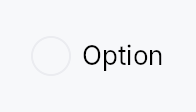
RadioButton — mutually exclusive selection control.
Public functions
RadioButton
Detailed description
Multiple RadioButtons share a Signal<usize>; selecting one writes its
value to the signal, which automatically deselects every sibling that
observes the same signal. The widget is non-generic: values are usize
indices into the caller's choice list. Wrap related buttons in a
RadioGroup to provide the AT "2 of 3"
positional announcement required by ARIA.
Label styling
The label is Body / Primary and the caption Small / Secondary by
default. RadioButton::label_style / RadioButton::label_color and
RadioButton::caption_style / RadioButton::caption_color override
them. A theme role colour still dims when the button is disabled; a literal
Color stays as given.
Touch and pen
Same shape as Checkbox: the pressed state is the
framework's (docs/touch-and-pen.md §7.1), selection lands on the release,
and the 24 dp MinSize around the 19 dp dot already clears the conformance
floor at Compact.
Accessibility
Reports Role::RadioButton with set_toggled mirroring the selected
state. Responds to Action::Click from assistive technology. The focus
ring is keyboard-only (:focus-visible gated by the input-modality
signal). When wrapped in RadioGroup, each button emits
push_to_radio_group([sibling_ids]) so screen readers can announce
positional membership.
#![allow(unused)]
fn main() {
use teksilo_widgets::RadioButton;
use teksilo_core::signal::Signal;
use teksilo_i18n::lit;
let selected = Signal::new(0_usize);
let _r0 = RadioButton::new(0, selected.clone()).label(lit!("Light"));
let _r1 = RadioButton::new(1, selected.clone()).label(lit!("Dark"));
let _r2 = RadioButton::new(2, selected.clone()).label(lit!("System"));
}
Density
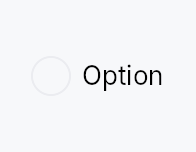
The picture above is the widget at TargetDensity::Compact, the mouse-and-keyboard ladder. Below is the same subject on the same canvas with only the ladder changed, so what moves is the density and nothing else — where the subject no longer fits, that is what the denser targets cost it at that size. See docs/density-and-targets.md.
Touch
API reference
📖 Full rustdoc API for this module
pub struct RadioButton
Import: use teksilo::widgets::RadioButton;
A single radio button option that writes value into a shared Signal<usize> on selection.
#![allow(unused)]
fn main() {
pub struct RadioButton { /* fields */ }
}
Methods
pub fn on_change(mut self, f: impl Fn(usize, &mut EventContext) + 'static) -> Self
Run f when the user selects this button and it was not already
selected, with this button's value and an EventContext, so it can do
what a bare Signal write cannot (ctx.send_intent(...),
ctx.set_locale(...), opening a window). Fires for the pointer, for
Space, and for an assistive-technology Click.
Re-activating the selected button writes the signal, as every path does, but reports nothing: that is not a change. Programmatic writes to the bound signal report nothing either — there is no event in flight to carry. Observe the signal for those.
pub fn new(value: usize, selected: Signal<usize>) -> Self
Create a radio button with the given value and shared selection signal.
pub fn label(mut self, label: impl Into<LocalizedString>) -> Self
Set the visible label text displayed to the right of the radio circle.
pub fn caption(mut self, text: impl Into<LocalizedString>) -> Self
Secondary explanatory text rendered below the label, left-aligned
with the label (not the radio circle). Uses the small /
text_secondary style. Has no effect unless label(...) is also set.
pub fn label_style( mut self, style: impl Into<teksilo_core::color_prop::TextStyleProp>, ) -> Self
Override the label's text style (font, size, weight). Accepts a
TextStyleRole, a TextStyle, or a Signal of either. Default is
TextStyleRole::Body.
pub fn label_color(mut self, color: impl Into<teksilo_core::color_prop::ColorProp>) -> Self
Override the label's text color. Accepts Color, a theme role, or a
Signal of either. Default is TextRole::Primary. A role still dims
to the disabled color when the radio button is disabled; a literal Color
stays as given.
pub fn caption_style( mut self, style: impl Into<teksilo_core::color_prop::TextStyleProp>, ) -> Self
Override the caption's text style. Default is TextStyleRole::Small.
pub fn caption_color(mut self, color: impl Into<teksilo_core::color_prop::ColorProp>) -> Self
Override the caption's text color. Accepts Color, a theme role, or
a Signal of either. Default is TextRole::Secondary. A role still
dims to the disabled color when the radio button is disabled; a literal
Color stays as given.
pub fn enabled(mut self, enabled: impl Into<Prop<bool>>) -> Self (default: true)
Set the enabled state, statically or reactively. Forwarded to
the arena via ctx.enabled_when(self_id, self.enabled.clone())
at build time.
pub fn variant(mut self, variant: RadioVariant) -> Self
Pick the design-language variant. Default Circle. The active
RadioStyle impl decides what the variant means visually.
pub fn style(mut self, style: impl teksilo_core::styles::RadioStyle) -> Self
Per-call style override. Replaces the theme-wide default
RadioStyle for just this RadioButton instance.
pub fn tooltip(mut self, text: impl Into<LocalizedString>) -> Self
Attach a plain single-line tooltip shown on hover.
pub fn rich_tooltip(mut self, key: impl Into<String>) -> Self
Attach a rich tooltip resolved from the app-wide tooltip
registry. See Button::rich_tooltip.
pub fn rich_tooltip_content(mut self, content: crate::tooltip::TooltipContent) -> Self
Attach a rich tooltip driven by inline TooltipContent.
pub fn composite_tooltip( mut self, content: impl teksilo_core::widget::Widget + 'static, ) -> Self
Attach a composite tooltip — third tier, hosting an arbitrary
widget tree. See Button::composite_tooltip.