ShortcutSettings
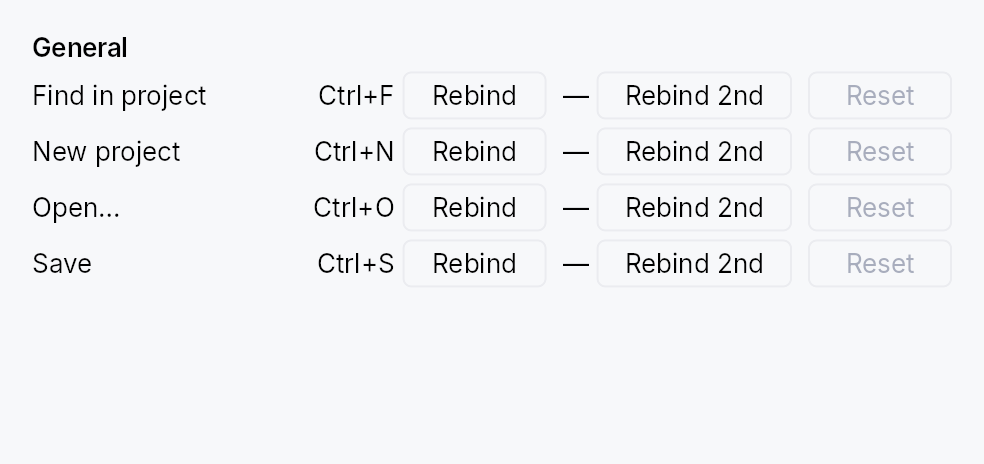
ShortcutSettings: the user-facing panel for browsing and rebinding an application's shortcuts.
Public types
| Kind | Name |
|---|---|
struct | ShortcutConflict — Describes a rebind that collides with an existing binding |
struct | ShortcutSettings — A settings panel for browsing and rebinding application shortcuts |
Public functions
ShortcutSettings
| Returns | Function |
|---|---|
| Constructors | |
Self | new() |
| Builder methods | |
Self | with_filter(filter: Signal<String>) |
Self | modified_only(signal: Signal<bool>) |
Self | toolbar(show: bool) |
Self | confirm_conflicts(yes: bool) |
Self | on_conflict(f: impl Fn(&ShortcutConflict) + 'static) |
Detailed description
It lists every shortcut in the tree's
ShortcutRegistry, grouped
by category, one row per command:
 [ Search commands or keys         ] [⌨]  [ ] Modified only  [Reset all…]

 File
    New project                 [Ctrl] [N]          +
    Open…                       [Ctrl] [O]          +
  ● Save                        [Ctrl] [Shift] [S]  [Ctrl] [S]   ↺
 Format
    Bold                        ( Press keys… )     +
       Press the new shortcut. Esc cancels, Del removes it.
- The chord is the control. Each chord is drawn as key caps; click
it (or focus it and press Enter or Space) to record a new one. The
first column is the shortcut, the second its alternative (
+adds one). Delete or Backspace on a focused chord removes it. - Recording shows "Press keys…" in a field the width of its column, so the list never reflows. Escape or Tab cancels; Delete or Backspace removes the chord; leaving the field cancels too. A key that cannot be a shortcut is refused with the reason, and recording goes on: a printable key needs Ctrl, Alt or ⌘ (Shift alone types a capital), and chords the system keeps (Alt+F4, Alt+Tab, ⌘Tab, ⌘Space, …) and Ctrl+Tab (the way out of a control that keeps Tab) are reserved.
- Conflicts are confirmed. A chord another command already uses
is not taken from it until the user presses "Reassign" on the line
that appears under the row.
confirm_conflicts(false)reassigns at once instead; either wayon_conflictis told. - Changed rows are marked with a dot and get a reset button, which puts that command's declared defaults back. "Reset all…" in the toolbar does it for every command, after a confirmation.
- Search matches a command's name, its group, its description and the text of its chords ("ctrl+s" finds Save). The keyboard button next to the field finds by chord instead: press it, press the keys, and the list shows the commands that use exactly that chord. "Modified only" narrows the list to the commands the user changed.
Commands are sorted by name within a group and groups by their title, both in the interface language. Every visible string comes from the framework's locale bundles.
Keyboard. The list is one Tab stop. The arrow keys move between rows and between a row's chord, alternative and reset button; Home and End go to the first and last row. Every control carries its command in its accessible name ("Save: Ctrl+S"), its description and whether the user changed it in its description, and the group titles are headings.
The widget owns the armed key capture. Dropping the widget cancels it, so navigating away mid-recording cannot rebind the next key pressed somewhere else.
The list grows with its content and does not scroll; place the widget
in a ScrollArea when there are more shortcuts than fit.
// Inside a settings Dialog build():
ctx.add(
    ShortcutSettings::new()
        .on_conflict(|c| println!("{} loses its shortcut", c.displaced_name)),
);
Density
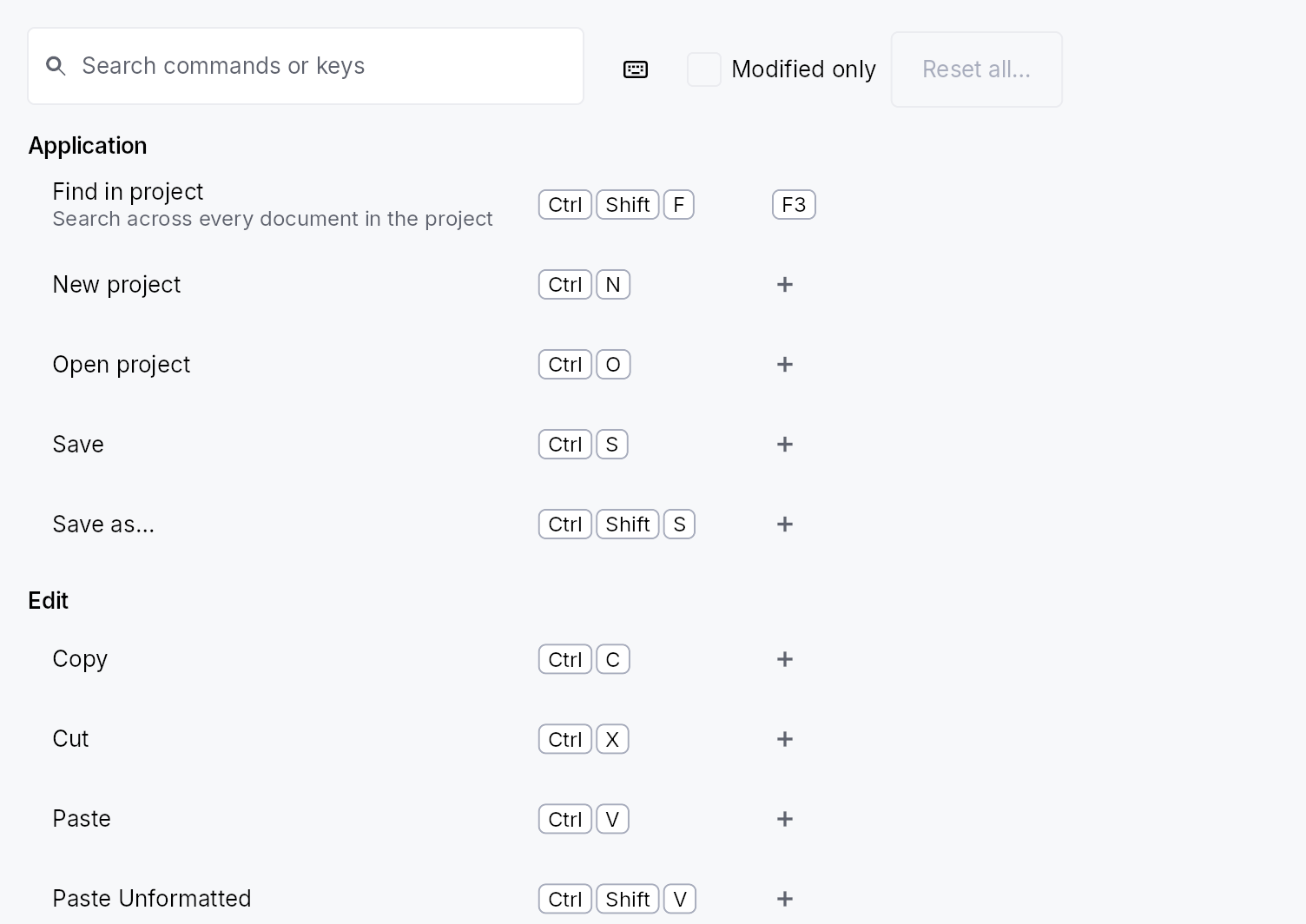
The picture above is the widget at TargetDensity::Compact, the mouse-and-keyboard ladder. Below is the same subject on the same canvas with only the ladder changed, so what moves is the density and nothing else — where the subject no longer fits, that is what the denser targets cost it at that size. See docs/density-and-targets.md.
Touch
API reference
📖 Full rustdoc API for this module
pub struct ShortcutConflict
Import: use teksilo::widgets::shortcut_settings::ShortcutConflict;
Describes a rebind that collides with an existing binding.
Passed to the ShortcutSettings::on_conflict callback so the app
can surface a toast ("Save lost its Ctrl+S binding").
#![allow(unused)]
fn main() {
pub struct ShortcutConflict { /* fields */ }
}
Fields
displaced_id:String— Id of the shortcut that currently owns the chord and loses it if the rebind goes ahead.displaced_name:String— Display name of that shortcut (its registryname).keystroke:KeyStroke— The chord being assigned to the new target.
pub struct ShortcutSettings
Import: use teksilo::widgets::ShortcutSettings;
A settings panel for browsing and rebinding application shortcuts.
See the module documentation for what it shows and how it behaves.
#![allow(unused)]
fn main() {
pub struct ShortcutSettings { /* fields */ }
}
Methods
pub fn new() -> Self
A panel listing every shortcut registered in the tree's
ShortcutRegistry, with its toolbar, asking before it takes a chord
from another command.
pub fn with_filter(mut self, filter: Signal<String>) -> Self (default: None)
Bind the search text to filter. The toolbar's search field edits
this signal, and anything else may write it too: a command palette
handing a query over, an app's own search box when the toolbar is
off. The list shows the shortcuts whose name, group, description or
chord contains the text (case-insensitive); an empty string shows
everything.
pub fn modified_only(mut self, signal: Signal<bool>) -> Self (default: None)
Bind "Modified only" to signal: while it is true the list shows
only the shortcuts the user changed. The toolbar's checkbox edits
the same signal.
pub fn toolbar(mut self, show: bool) -> Self
Show the toolbar (search field, find by keys, "Modified only",
"Reset all…"). On by default. Turn it off when the surrounding UI
already has a search field, and drive the list through
with_filter and
modified_only.
pub fn confirm_conflicts(mut self, yes: bool) -> Self
Ask before a rebind takes a chord from another shortcut. On by
default: the colliding rebind shows "{chord} is already used by
{command}" under the row with Reassign and Cancel, and nothing
changes until the user answers. With false the other shortcut
loses the chord at once, and a screen reader is told which one.
pub fn on_conflict(mut self, f: impl Fn(&ShortcutConflict) + 'static) -> Self
Register a callback fired whenever a rebind collides with an
existing binding, regardless of confirm_conflicts. The
callback receives the displaced shortcut's id, name, and the
chord, so the app can surface a toast. It fires before the
displaced binding is removed (when asking first, before the user
has answered).