SplitButton
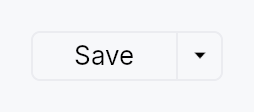
SplitButton — a button split into two regions sharing a single frame.
Public types
| Kind | Name |
|---|---|
const | SPLIT_BUTTON_HEIGHT — SplitButton design tokens |
fn | split_button_height — SPLIT_BUTTON_HEIGHT raised to the density's target_size (24 / 32 / 44 dp) |
const | SPLIT_BUTTON_MIN_WIDTH |
fn | split_button_min_width — SPLIT_BUTTON_MIN_WIDTH raised to the density's target_size (24 / 32 / 44 dp) |
const | SPLIT_BUTTON_PADDING_HORIZONTAL |
fn | split_button_padding_horizontal — SPLIT_BUTTON_PADDING_HORIZONTAL scaled by the density's spacing_factor (1.00 / 1.15 / 1.30) |
const | SPLIT_BUTTON_PADDING_VERTICAL |
fn | split_button_padding_vertical — SPLIT_BUTTON_PADDING_VERTICAL scaled by the density's spacing_factor (1.00 / 1.15 / 1.30) |
const | SPLIT_BUTTON_CORNER_RADIUS |
const | SPLIT_BUTTON_BORDER_WIDTH |
const | SPLIT_BUTTON_CHEVRON_WIDTH |
const | SPLIT_BUTTON_DIVIDER_WIDTH |
const | SPLIT_BUTTON_CHEVRON_ICON_SIZE |
const | SPLIT_BUTTON_ICON_LABEL_GAP — Gap between an optional main-region leading icon and the label |
fn | split_button_icon_label_gap — SPLIT_BUTTON_ICON_LABEL_GAP scaled by the density's spacing_factor (1.00 / 1.15 / 1.30) |
struct | SplitButton — A button split into a default-action region and a chevron dropdown region |
Public functions
SplitButton
Detailed description
The left region is the default action: it shows the label of the
currently-selected item and, on click, fires that item's command
(behaving like a regular Button). The right
region is a narrow chevron zone that, on click, opens a
MenuList of related actions. Picking an
action from the dropdown fires it and promotes its index to become the
new default for the session (IntelliJ's "remember last used"
convention).
SplitButton reuses MenuItem verbatim
for the dropdown rows — the caller passes real MenuItem values via
.item(...), so icons, shortcut labels, enabled flags, and separators
all come for free.
#![allow(unused)]
fn main() {
use teksilo_widgets::{SplitButton, MenuItem, ButtonVariant};
use teksilo_i18n::lit;
use teksilo_core::Intent;
let _w = SplitButton::new()
    .item(MenuItem::new(lit!("Run")).on_activate_fn(|ctx| ctx.send_intent(Intent::new("app.run"))))
    .item(MenuItem::new(lit!("Run Tests")).on_activate_fn(|ctx| ctx.send_intent(Intent::new("app.run-tests"))))
    .separator()
    .item(MenuItem::new(lit!("Debug")).on_activate_fn(|ctx| ctx.send_intent(Intent::new("app.debug"))))
    .variant(ButtonVariant::Plain);
}
Touch and pen
The action half is a target in its own right and needs nothing. The chevron
half is 22 dp wide at every density — a dimension below the conformance floor
cannot be routed through dp, which is a floor and would widen the paint at
Compact — so it declares a Widget::hit_outset instead, with the whole
shortfall on its leading edge: the trailing edge is the control's own
frame, and an outset never escapes its parent.
That means a direct pointer aiming between the halves gets the chevron, and a
precise pointer gets exactly what is painted (hit_outset is zero for one).
Of the two halves the action half is the wider, so it is the one that lends
the dp — and the press it loses at its trailing edge is a press aimed at the
chevron.
Density
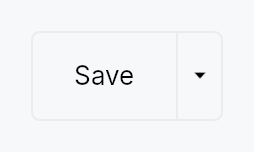
The picture above is the widget at TargetDensity::Compact, the mouse-and-keyboard ladder. Below is the same subject on the same canvas with only the ladder changed, so what moves is the density and nothing else — where the subject no longer fits, that is what the denser targets cost it at that size. See docs/density-and-targets.md.
Touch
API reference
📖 Full rustdoc API for this module
pub const SPLIT_BUTTON_HEIGHT
Import: use teksilo::widgets::split_button::SPLIT_BUTTON_HEIGHT;
SplitButton design tokens.
#![allow(unused)]
fn main() {
pub const SPLIT_BUTTON_HEIGHT: f32 = 24.0;
}
pub fn split_button_height(...)
Import: use teksilo::widgets::split_button::split_button_height;
SPLIT_BUTTON_HEIGHT raised to the density's target_size
(24 / 32 / 44 dp). The identity at Compact.
#![allow(unused)]
fn main() {
pub fn split_button_height(tokens: &InputTokens) -> f32;
}
pub const SPLIT_BUTTON_MIN_WIDTH
Import: use teksilo::widgets::split_button::SPLIT_BUTTON_MIN_WIDTH;
#![allow(unused)]
fn main() {
pub const SPLIT_BUTTON_MIN_WIDTH: f32 = 72.0;
}
pub fn split_button_min_width(...)
Import: use teksilo::widgets::split_button::split_button_min_width;
SPLIT_BUTTON_MIN_WIDTH raised to the density's target_size
(24 / 32 / 44 dp). The identity at Compact.
#![allow(unused)]
fn main() {
pub fn split_button_min_width(tokens: &InputTokens) -> f32;
}
pub const SPLIT_BUTTON_PADDING_HORIZONTAL
Import: use teksilo::widgets::split_button::SPLIT_BUTTON_PADDING_HORIZONTAL;
#![allow(unused)]
fn main() {
pub const SPLIT_BUTTON_PADDING_HORIZONTAL: f32 = 14.0;
}
pub fn split_button_padding_horizontal(...)
Import: use teksilo::widgets::split_button::split_button_padding_horizontal;
SPLIT_BUTTON_PADDING_HORIZONTAL scaled by the density's spacing_factor
(1.00 / 1.15 / 1.30).
#![allow(unused)]
fn main() {
pub fn split_button_padding_horizontal(tokens: &InputTokens) -> f32;
}
pub const SPLIT_BUTTON_PADDING_VERTICAL
Import: use teksilo::widgets::split_button::SPLIT_BUTTON_PADDING_VERTICAL;
#![allow(unused)]
fn main() {
pub const SPLIT_BUTTON_PADDING_VERTICAL: f32 = 0.0;
}
pub fn split_button_padding_vertical(...)
Import: use teksilo::widgets::split_button::split_button_padding_vertical;
SPLIT_BUTTON_PADDING_VERTICAL scaled by the density's spacing_factor
(1.00 / 1.15 / 1.30).
#![allow(unused)]
fn main() {
pub fn split_button_padding_vertical(tokens: &InputTokens) -> f32;
}
pub const SPLIT_BUTTON_CORNER_RADIUS
Import: use teksilo::widgets::split_button::SPLIT_BUTTON_CORNER_RADIUS;
#![allow(unused)]
fn main() {
pub const SPLIT_BUTTON_CORNER_RADIUS: f32 = 4.0;
}
pub const SPLIT_BUTTON_BORDER_WIDTH
Import: use teksilo::widgets::split_button::SPLIT_BUTTON_BORDER_WIDTH;
#![allow(unused)]
fn main() {
pub const SPLIT_BUTTON_BORDER_WIDTH: f32 = 1.0;
}
pub const SPLIT_BUTTON_CHEVRON_WIDTH
Import: use teksilo::widgets::split_button::SPLIT_BUTTON_CHEVRON_WIDTH;
#![allow(unused)]
fn main() {
pub const SPLIT_BUTTON_CHEVRON_WIDTH: f32 = 22.0;
}
pub const SPLIT_BUTTON_DIVIDER_WIDTH
Import: use teksilo::widgets::split_button::SPLIT_BUTTON_DIVIDER_WIDTH;
#![allow(unused)]
fn main() {
pub const SPLIT_BUTTON_DIVIDER_WIDTH: f32 = 1.0;
}
pub const SPLIT_BUTTON_CHEVRON_ICON_SIZE
Import: use teksilo::widgets::split_button::SPLIT_BUTTON_CHEVRON_ICON_SIZE;
#![allow(unused)]
fn main() {
pub const SPLIT_BUTTON_CHEVRON_ICON_SIZE: f32 = 12.0;
}
pub const SPLIT_BUTTON_ICON_LABEL_GAP
Import: use teksilo::widgets::split_button::SPLIT_BUTTON_ICON_LABEL_GAP;
Gap between an optional main-region leading icon and the label.
#![allow(unused)]
fn main() {
pub const SPLIT_BUTTON_ICON_LABEL_GAP: f32 = 6.0;
}
pub fn split_button_icon_label_gap(...)
Import: use teksilo::widgets::split_button::split_button_icon_label_gap;
SPLIT_BUTTON_ICON_LABEL_GAP scaled by the density's spacing_factor
(1.00 / 1.15 / 1.30).
#![allow(unused)]
fn main() {
pub fn split_button_icon_label_gap(tokens: &InputTokens) -> f32;
}
pub struct SplitButton
Import: use teksilo::widgets::SplitButton;
A button split into a default-action region and a chevron dropdown region.
See the module-level documentation for a usage overview.
#![allow(unused)]
fn main() {
pub struct SplitButton { /* fields */ }
}
Methods
pub fn new() -> Self
Standard SplitButton: picking an item from the dropdown both fires the item's action and promotes it to become the new default for the session. The main region's label and click action update to match the most recently picked item.
pub fn new_static() -> Self
Static-default SplitButton: the main region is pinned to
initial_selected (default 0) and never changes after the
user picks something from the dropdown. Picking an item still
fires that item's action — only the promotion is skipped.
Use this when the main region represents a semantically fixed primary action (e.g. "Commit") and the dropdown offers related variants ("Commit and Push", "Commit and Push to…") that should not displace the primary.
pub fn item(mut self, item: MenuItem) -> Self
Add a menu item. The item is reused verbatim as a row of the dropdown, and its label + action are also used to drive the main region (when its index is the current default).
pub fn items(self, items: impl IntoIterator<Item = MenuItem>) -> Self
Add several menu items from an iterator, in order.
The loop form of item, and the usual one: a split
button's dropdown is normally built from a list of commands.
pub fn separator(mut self) -> Self
Add a separator row in the dropdown. Separators are skipped when
computing item indices for initial_selected.
pub fn variant(mut self, variant: ButtonVariant) -> Self (default: ButtonVariant::Plain)
Set the visual style variant (filled, plain, ghost, …) for the entire
button frame. Mirrors the same variants as
Button::variant.
pub fn icon(mut self, icon: IconWidget) -> Self
Set a leading icon for the main (default-action) region, rendered before
the label (mirrors Button::icon with
IconLocation::Leading). Unlike the per-row MenuItem::icons, this glyph
is fixed regardless of which item is the current default — use it for a
stable action affordance (e.g. a "+" add glyph).
The icon's tint follows the main-region label (the variant/interaction
cascade, or text_role when overridden), so any
colour set on the passed IconWidget is replaced — same contract as
Button. Its size is left alone, so .icon_size(..) on the caller's
widget is honoured.
pub fn style(mut self, style: impl SplitButtonStyle) -> Self
Override the Tier-3 frame chrome for this instance. Takes precedence
over theme.style_slots.split_button and the built-in
RecipeSplitButtonStyle.
pub fn text_style(mut self, style: impl Into<teksilo_core::color_prop::TextStyleProp>) -> Self
Override the main-region label text style (font, size, weight).
Accepts a TextStyleRole, a TextStyle, or a Signal of either.
Default (unset) is the inner TextWidget default — e.g. pass
TextStyleRole::BodyBold for a bold default action.
pub fn text_role(mut self, color: impl Into<teksilo_core::color_prop::ColorProp>) -> Self
Override the control's text colour — the main-region label, its
leading icon, and the chevron, which the
variant/interaction cascade tints together. Accepts Color, a role,
or a Signal of either. Default (unset) is that cascade; setting this
replaces it wholesale (loses hover/disabled tint).
pub fn enabled(mut self, enabled: impl Into<Prop<bool>>) -> Self (default: true)
Set the enabled state, statically or reactively. Forwarded to the arena at build time.
pub fn initial_selected(mut self, index: usize) -> Self
Which item index (counting only items, not separators) should be the initial default. Defaults to 0.
pub fn tooltip(mut self, text: impl Into<LocalizedString>) -> Self
Attach a tooltip to the main (default-action) region. Same hover
delay as Button::tooltip.
pub fn rich_tooltip(mut self, key: impl Into<String>) -> Self
Attach a rich tooltip to the main region.
pub fn rich_tooltip_content(mut self, content: crate::tooltip::TooltipContent) -> Self
Attach a rich tooltip to the main region driven by inline TooltipContent.
pub fn composite_tooltip( mut self, content: impl teksilo_core::widget::Widget + 'static, ) -> Self
Attach a composite tooltip to the main region.
pub fn chevron_tooltip(mut self, text: impl Into<LocalizedString>) -> Self
Override the tooltip shown on hover over the trailing chevron region. When unset, the chevron gets a default "Show dropdown menu" tooltip so its affordance isn't silent.
pub fn chevron_rich_tooltip(mut self, key: impl Into<String>) -> Self
Attach a rich tooltip to the chevron region.
pub fn chevron_rich_tooltip_content(mut self, content: crate::tooltip::TooltipContent) -> Self
Attach a rich tooltip to the chevron region driven by inline TooltipContent.
pub fn chevron_composite_tooltip( mut self, content: impl teksilo_core::widget::Widget + 'static, ) -> Self
Attach a composite tooltip to the chevron region.